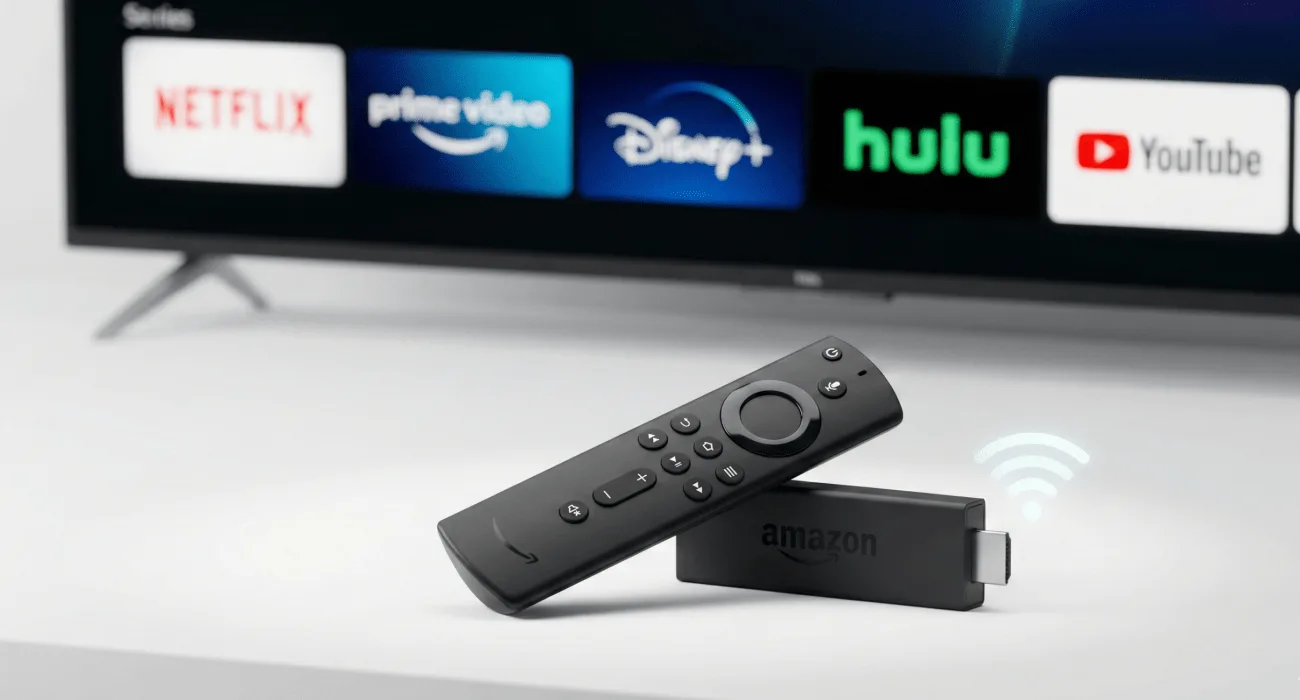
Looking to transform your regular TV into a smart entertainment powerhouse? The Amazon Fire TV Stick is one of the most popular streaming devices in the UK, offering access to thousands of apps, 4K streaming and voice control all for under £50.
In this comprehensive guide, we’ll cover everything you need to know about the Fire TV Stick, including what it is, how it works, which model to choose, setup instructions, and whether it’s worth the investment in 2026.
What is Amazon Fire TV Stick?
The Amazon Fire TV Stick is a compact streaming media player that plugs directly into your TV’s HDMI port, instantly converting any television into a smart TV capable of streaming content from the internet.
Think of it as a tiny computer dedicated to entertainment. It connects to your WiFi and gives you access to apps like Netflix, Prime Video, Disney+, BBC iPlayer, YouTube, and thousands more.
Key Features at a Glance:
- Portable design — smaller than a USB stick, fits in your pocket
- 4K Ultra HD streaming with HDR support (on 4K models)
- Alexa voice control built into the remote
- Access to 500,000+ movies and TV shows across apps
- Works with any TV that has an HDMI port
- Gaming capabilities with optional controller
- Smart home hub — control lights, thermostats and cameras
How Does Amazon Fire Stick Work?
The Fire Stick operates on a simple principle:
- Physical Connection: Plug the Fire Stick into your TV’s HDMI port and connect the power adapter to a wall outlet
- Internet Connection: Connect to your home WiFi network
- Content Access: Browse and download apps from the Amazon App Store
- Streaming: Select content from your chosen apps and stream directly to your TV
The device runs on Fire OS (Amazon’s custom version of Android), which provides a user-friendly interface optimized for TV screens.
Amazon Fire Stick Models Compared (2026)
Amazon currently offers several Fire Stick variants. Here’s how they compare:
Fire TV Stick Lite – £29.99
Specifications:
- Resolution: Full HD 1080p
- Processor: Quad-core 1.7 GHz
- Storage: 8GB
- WiFi: Dual-band WiFi 5
- HDR Support: No
- Remote: Alexa Voice Remote Lite (TV controls, no volume buttons)
Best For: Budget buyers, bedroom/second TVs, basic streaming needs
Fire TV Stick (3rd Gen) – £44.99
Specifications:
- Resolution: Full HD 1080p
- Processor: Quad-core 1.7 GHz
- Storage: 8GB
- WiFi: Dual-band WiFi 5
- HDR Support: HDR, HDR10, HDR10+
- Remote: Alexa Voice Remote (full TV controls including volume)
Best For: Most users with 1080p TVs, balanced features and price
Fire TV Stick 4K – £49.99 ⭐ MOST POPULAR
Specifications:
- Resolution: 4K Ultra HD (2160p)
- Processor: Quad-core 1.7 GHz
- Storage: 8GB
- WiFi: Dual-band WiFi 6
- HDR Support: Dolby Vision, HDR10, HDR10+, HLG
- Audio: Dolby Atmos surround sound
- Remote: Alexa Voice Remote (3rd Gen) with TV controls
Best For: 4K TV owners, movie enthusiasts, future-proofing
Fire TV Stick 4K Max – £59.99
Specifications:
- Resolution: 4K Ultra HD
- Processor: Quad-core 1.8 GHz (40% more powerful)
- RAM: 2GB (vs 1.5GB on standard 4K)
- Storage: 16GB
- WiFi: WiFi 6E (latest standard)
- HDR Support: Dolby Vision, HDR10, HDR10+, HLG
- Audio: Dolby Atmos
- Remote: Alexa Voice Remote Pro (optional)
Best For: Power users, gamers, multiple simultaneous apps, fastest performance
Fire TV Cube – £139.99
Specifications:
- Resolution: 4K Ultra HD
- Processor: Hexa-core (6-core) 2.2 GHz
- Storage: 16GB
- WiFi: WiFi 6E
- Hands-free Alexa: Built-in speakers, no remote needed
- Ethernet Port: For wired internet connection
- HDMI Input: Connect cable/satellite box
Best For: Home theater enthusiasts, hands-free control fans, cable box integration
Fire Stick Model Comparison Table
| Feature | Lite | Standard | 4K ⭐ | 4K Max | Cube |
|---|---|---|---|---|---|
| Price | £29.99 | £44.99 | £49.99 | £59.99 | £139.99 |
| Resolution | 1080p | 1080p | 4K | 4K | 4K |
| Processor | 1.7GHz | 1.7GHz | 1.7GHz | 1.8GHz | 2.2GHz |
| WiFi | WiFi 5 | WiFi 5 | WiFi 6 | WiFi 6E | WiFi 6E |
| Dolby Vision | ❌ | ❌ | ✅ | ✅ | ✅ |
| Dolby Atmos | ❌ | ✅ | ✅ | ✅ | ✅ |
| Storage | 8GB | 8GB | 8GB | 16GB | 16GB |
| Best For | Budget | General | 4K TVs | Power users | Premium |
Recommendation: For most users, the Fire TV Stick 4K (£49.99) offers the best balance of features, performance, and future-proofing.
What Can You Do With Fire TV Stick?
1. Stream From 500,000+ Movies & TV Shows
Access content across apps like:
- Netflix — thousands of movies and series
- Amazon Prime Video — exclusive Amazon Originals
- Disney+ — Marvel, Star Wars, Pixar content
- Apple TV+ — Apple’s original programming
- BBC iPlayer, ITV Hub, All 4, My5 — UK catch-up TV
- YouTube — billions of videos
- Now TV — Sky content without satellite
- Paramount+, Discovery+, BritBox, and hundreds more
2. Listen to Music
Stream music through your TV speakers:
- Spotify — 80+ million songs
- Amazon Music — included with Prime
- Apple Music — full Apple catalog
- YouTube Music
- Tidal, Deezer, and other services
3. Play Games
Download games from the Amazon App Store:
- Casual games (puzzles, arcade classics)
- Action games (with optional game controller)
- Popular titles like Asphalt 8, Crossy Road, Sonic the Hedgehog
Optional: Purchase Amazon Fire TV Game Controller (£39.99) for console-style gaming.
4. Browse the Web
Access the internet directly on your TV:
- Silk Browser (Amazon’s web browser)
- Firefox for Fire TV
- Browse websites, check email, watch online videos
5. Control Your Smart Home
Use Fire Stick as a smart home hub:
- View security camera feeds on TV
- Control smart lights (Philips Hue, LIFX)
- Adjust thermostats (Nest, Hive)
- Lock smart door locks
- Create Alexa routines
Example voice commands:
- “Alexa, show me the front door camera”
- “Alexa, dim the living room lights to 50%”
- “Alexa, set the thermostat to 20 degrees”
6. Use Alexa Voice Control
The Fire Stick remote includes Alexa voice assistant:
- “Alexa, play Stranger Things on Netflix”
- “Alexa, find action movies”
- “Alexa, pause” / “Alexa, rewind 30 seconds”
- “Alexa, what’s the weather tomorrow?”
- “Alexa, turn off the TV” (if your TV supports HDMI-CEC)
7. Mirror Your Phone/Laptop
Cast content from mobile devices:
- Screen mirroring from Android phones/tablets
- AirPlay support (Fire TV Stick 4K and newer) for iPhone/iPad
- Display photos, videos, presentations on the big screen
8. Access Live TV
Watch live television through apps:
- BBC iPlayer — live BBC channels
- ITV Hub — live ITV channels
- All 4 — live Channel 4
- TVPlayer — 100+ free live channels
- Pluto TV — 100+ free streaming channels
How to Set Up Your Amazon Fire Stick (Step-by-Step)
Setting up a Fire Stick takes just 5-10 minutes:
Step 1: Unbox and Connect
- Plug the Fire Stick into your TV’s HDMI port
- Connect the USB power cable to the Fire Stick
- Plug the power adapter into a wall outlet (don’t use TV USB port — insufficient power)
- Turn on your TV and select the correct HDMI input
Step 2: Pair the Remote
- The remote should pair automatically
- If not, hold the Home button for 10 seconds
Step 3: Connect to WiFi
- Select your WiFi network from the list
- Enter your WiFi password using the on-screen keyboard
Step 4: Sign In to Amazon Account
- Enter your Amazon account email and password
- Or scan the QR code with your phone
- Don’t have an Amazon account? Create one free at amazon.co.uk
Step 5: Configure Settings
- Choose parental controls (optional)
- Enable data monitoring (to track usage)
- Save WiFi password for future devices (optional)
Step 6: Download Apps
- Browse the App Store
- Download your favorite streaming apps
- Sign in to each app with your credentials
Done! Start streaming immediately.
Do You Need an Amazon Prime Membership?
No, Prime is not required to use Fire Stick. However, Prime membership (£8.99/month or £95/year) offers benefits:
Prime Benefits on Fire Stick:
- Access to Prime Video (included free)
- Exclusive deals on app subscriptions
- Free music streaming via Amazon Music
- Early access to Amazon deals
Without Prime: You can still use Netflix, Disney+, BBC iPlayer, YouTube, and all other apps normally.
Fire Stick vs Competitors
Fire Stick vs Roku
| Feature | Fire Stick 4K | Roku Streaming Stick 4K |
|---|---|---|
| Price | £49.99 | £49.99 |
| Voice Assistant | Alexa | Roku Voice |
| App Selection | 500,000+ | 500,000+ |
| Best For | Amazon/Alexa users | Neutral platform fans |
Verdict: Fire Stick wins for Alexa smart home integration; Roku better for unbiased content recommendations.
Fire Stick vs Google Chromecast
| Feature | Fire Stick 4K | Chromecast with Google TV |
|---|---|---|
| Price | £49.99 | £59.99 |
| Voice Assistant | Alexa | Google Assistant |
| Interface | Fire OS | Google TV |
| Best For | Alexa ecosystems | Google ecosystem users |
Verdict: Fire Stick better value; Chromecast better for Google Home users.
Fire Stick vs Apple TV
| Feature | Fire Stick 4K | Apple TV 4K |
|---|---|---|
| Price | £49.99 | £149+ |
| Performance | Good | Excellent |
| App Selection | Larger | Smaller but premium |
| Best For | Budget buyers | Apple ecosystem devotees |
Verdict: Apple TV offers superior performance but costs 3x more; Fire Stick wins on value.
Fire Stick Internet Speed Requirements
For optimal streaming performance:
- HD (720p): Minimum 3 Mbps
- Full HD (1080p): Minimum 5 Mbps
- 4K Ultra HD: Minimum 25 Mbpsexapmle.jpg
- Multiple devices: Add 5-10 Mbps per additional stream
Pro Tip: For best results, connect Fire Stick to WiFi 5GHz band (less interference) or use the Amazon Ethernet Adapter (£14.99) for wired connection.
Common Fire Stick Problems & Solutions
Problem: Remote Not Working
Solutions:
- Replace batteries (requires 2x AAA)
- Unpair and re-pair: Hold Home button for 10 seconds
- Restart Fire Stick: Settings > My Fire TV > Restart
Problem: Buffering/Slow Streaming
Solutions:
- Check internet speed (use Fast.com app)
- Move closer to WiFi router
- Restart Fire Stick and router
- Clear app cache: Settings > Applications > Manage Installed Applications > [App] > Clear Cache
- Lower video quality in app settings
Problem: App Crashes
Solutions:
- Force stop app: Settings > Applications > Manage Installed Applications > [App] > Force Stop
- Clear app data (logs you out)
- Uninstall and reinstall app
- Update Fire Stick: Settings > My Fire TV > About > Check for Updates
Problem: No Sound
Solutions:
- Check TV volume and mute
- Verify HDMI connection is secure
- Change audio settings: Settings > Display & Sounds > Audio > Dolby Digital Output > Off
Problem: Overheating
Solutions:
- Don’t block Fire Stick — ensure air circulation
- Use HDMI extender cable (included in box) to move device away from hot TV back panel
- Allow Fire Stick to cool down periodically
Fire Stick Hidden Features & Tips
1. Screen Mirroring from iPhone
Fire Stick 4K and newer support AirPlay — mirror iPhone/iPad without extra apps.
2. Free Movie Channels
Apps like Pluto TV, Tubi, and IMDb TV offer thousands of free movies and shows with ads.
3. Alexa Skills on TV
Enable Alexa skills for games, meditation, news briefings, and more via voice commands.
4. Customize Home Screen
Hold Select on apps to move them, or hide unwanted apps: Settings > Preferences > Home Screen.
5. Enable Developer Options
Settings > My Fire TV > About > Click on Fire TV Stick 7 times to unlock developer menu (for advanced users/sideloading).
6. Use Fire Stick While Traveling
Take to hotels, holiday homes, or friend’s houses — works on any TV with HDMI and WiFi.
7. Parental Controls
Set PIN for purchases and restrict mature content: Settings > Preferences > Parental Controls.
Is Amazon Fire Stick Worth It in 2026?
Pros:
✅ Affordable — £29.99-£59.99 vs £100+ for competitors
✅ Easy setup — plug-and-play in 5 minutes
✅ Alexa integration — voice control everything
✅ Massive app selection — 500,000+ titles
✅ Portable — take anywhere
✅ 4K HDR streaming — cinema-quality picture
✅ Regular updates — Amazon continuously adds features
✅ Works with old TVs — any HDMI TV becomes smart
❌ Requires subscriptions — Netflix, Disney+ cost extra (not Amazon’s fault)
❌ Amazon-centric interface — promotes Prime Video prominently
❌ Ads on home screen — promotional banners (can hide most)
❌ Occasional bugs — like any tech device
❌ Limited gaming — not a console replacement
Bottom Line: For under £50, the Fire Stick 4K is one of the best entertainment investments you can make, saving hundreds on cable bills while providing access to virtually all streaming content.
Where to Buy Amazon Fire TV Stick in the UK
Official Retailers:
- Amazon.co.uk — often has deals, especially Prime Day and Black Friday
- Argos — high street availability
- Currys — in-store demos available
- John Lewis — includes extended warranty
- Tesco, Asda, Sainsbury’s — occasional promotions
Avoid: Unverified eBay/Facebook sellers offering “jailbroken” or “fully loaded” Fire Sticks — these may contain pirated apps and violate terms of service.
Frequently Asked Questions
Can I use Fire Stick without WiFi?
No, WiFi is required for streaming. However, you can download select Prime Video content for offline viewing via mobile app, then cast to TV.
Does Fire Stick work with any TV?
Yes, any TV with an HDMI port (virtually all TVs since 2005).
Can I use Fire Stick abroad?
Yes, it works internationally. However, some apps (like BBC iPlayer) are geo-restricted to the UK.
How long does Fire Stick last?
Typically 3-5 years with regular software updates. Amazon supports devices for 4+ years.
Can I watch live sports on Fire Stick?
Yes, via apps like Now Sports, BT Sport app, BBC iPlayer (for select matches), or streaming services.
Is Fire Stick better than Smart TV apps?
Fire Stick is often faster, gets more updates, and offers better app selection than built-in Smart TV systems.
Conclusion: Should You Buy Amazon Fire TV Stick?
If you want to:
- ✅ Make an old TV smart for under £50
- ✅ Access Netflix, Disney+, and 500+ other apps easily
- ✅ Use voice control with Alexa
- ✅ Stream in 4K without buying a new TV
- ✅ Take entertainment on the go
Then yes — Amazon Fire TV Stick is absolutely worth it.
Our Recommendation: Get the Amazon Fire TV Stick 4K (£49.99) — it future-proofs your setup and works beautifully on both 4K and 1080p TVs.
Ready to Get Your Fire Stick?
👉 Buy Fire TV Stick 4K – £49.99
👉 Compare All Fire Stick Models
👉 View Setup Video Guide